



By Bohdan Vasylkiv
- CEO & Co-Founder
What Are the Different Types of Construction Software? A Practical Breakdown
Not sure which construction software to use? Compare types — from project management and scheduling to estimating — and choose the right fit for your team.
Key Takeaways
- Construction software covers several distinct categories, each built for a specific job.
- The core groups are project management, scheduling, estimating, accounting, documents, and safety.
- Start with the tool that fixes your most expensive daily problem, then expand.
- Unified platforms combine many functions, while custom builds fit unusual workflows best.
Every construction project runs on information: who is doing what, when materials arrive, how much each task costs, and whether anyone got hurt. The different types of construction software each manage one of those streams. Knowing which category solves which problem keeps you from paying for tools you never open. This guide explains the main categories in plain terms and helps you match them to the work you actually do.
Why Construction Teams Can't Run on Spreadsheets Alone
Spreadsheets work for small projects but break down when multiple people need the same data. A foreman updates a file, the office misses the change, and different teams end up working from different versions of the file.
They also provide no alerts for outdated drawings, budget overruns, or missed inspections. On active job sites, those gaps often lead to rework, disputes, and lost profit.
Purpose-built software closes those gaps. This is the practical reason the various types of construction software exist: each keeps the office and the field on a single, live data set, and many teams treat the switch as their entry point to proper business process automation, where routine updates and approvals no longer depend on someone remembering to send an email.
The Main Types of Construction Software at a Glance
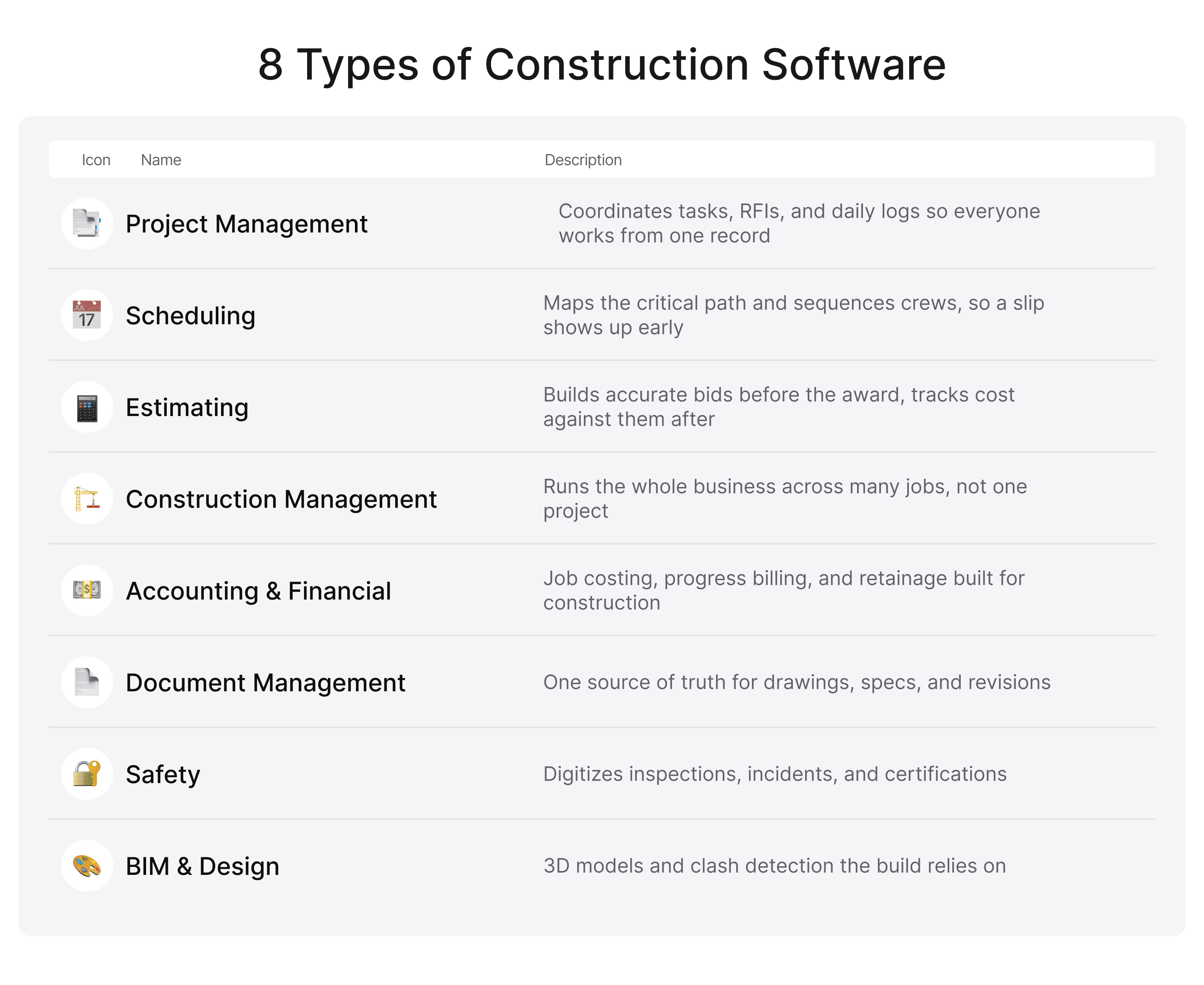
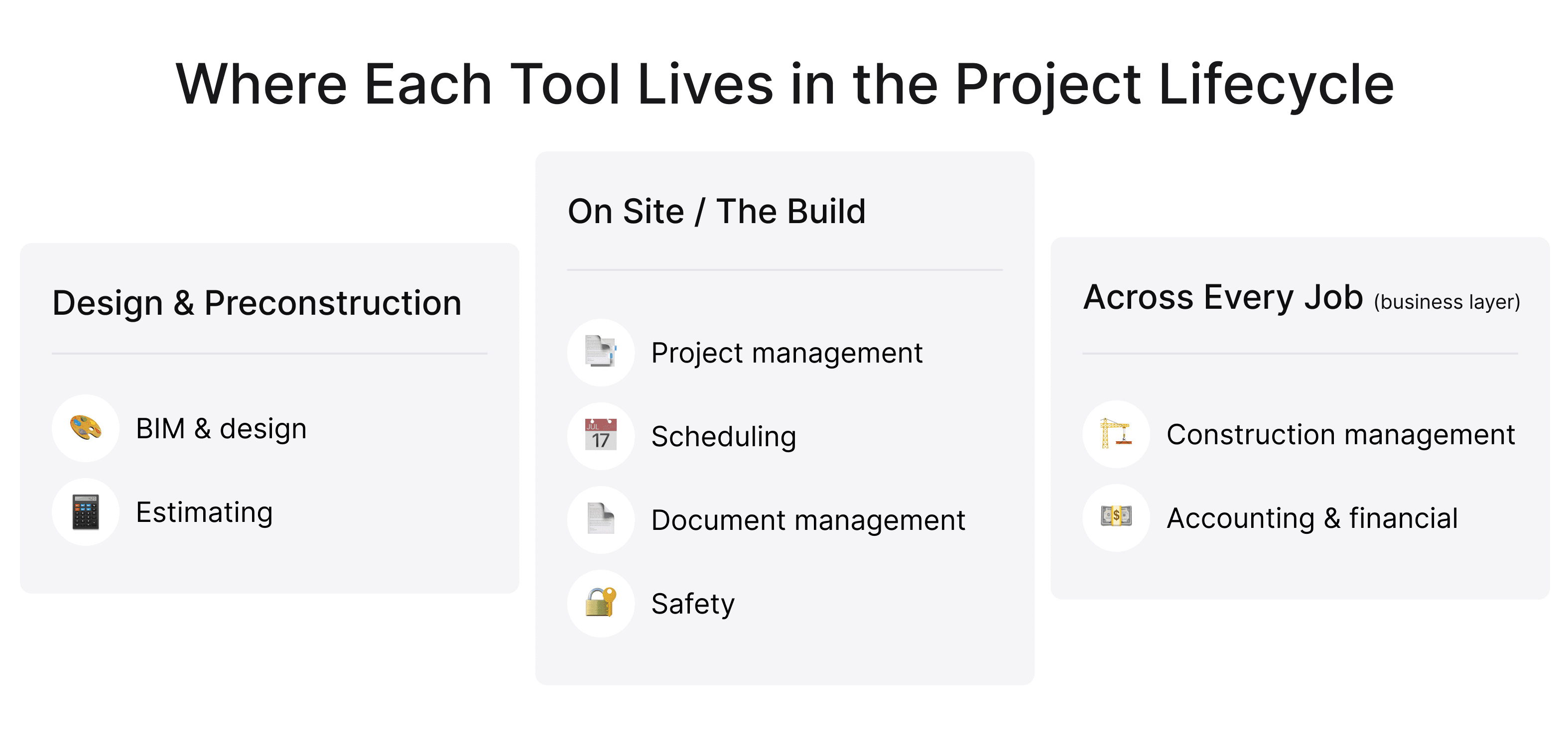
When people compare the types of construction software, they are really comparing jobs to be done. 8 categories cover most needs: project management for coordination, scheduling for sequencing, estimating for pricing, construction management for running the whole business, accounting for money, document control for files, safety for compliance, and BIM and design for modeling the build.
 Click to expand
Most contractors use several categories together, choosing tools based on their trade, project complexity, and biggest operational challenges.
Construction Project Management Software
What does it actually do on a job site?
Project management software coordinates daily work by tracking tasks, RFIs, submittals, daily reports, and project status in a single platform.
Its main benefit is visibility. Teams can spot issues early, avoid delays, and ensure field and office staff work from the same up-to-date information.
Key features to look for
Prioritize features that match the site's reality: a mobile app that works offline, instant sync between the trailer and the office, photo and markup support, and clean integrations with your accounting and scheduling tools. Weak integration forces double entry, which quietly cancels the time the software saved.
Permission controls matter too. Subcontractors should see their scope without access to the full project, and owners should get progress views without edit rights.
Types of construction project management software
The types of construction project management software are divided mainly by project scale. Lightweight trackers suit residential builders and remodelers who run a handful of jobs. Mid-range platforms add cost tracking and client portals. Enterprise systems coordinate hundreds of users across large commercial work.
Among these types of construction project management software, fit matters more than feature count. A small contractor rarely benefits from an enterprise suite. For that profile, a focused guide to construction project management software for small business points to tools sized for the work.
Construction Scheduling Software
How scheduling software fits into the project timeline
Scheduling answers a different question from project management: the order in which work happens, and what breaks when one step slips. The types of construction scheduling software all build on the same core, mapping the critical path and balancing crews and equipment across the calendar, then differ in how far ahead they let you plan.
A clear schedule shows the ripple effect early. If steel arrives two days late, you see the pour, the inspection, and the framing shift with it, which gives you time to resequence rather than react.
Types of construction scheduling software
At the simple end sit drag-and-drop calendars, fine for a single building. At the complex end, critical-path engines handle thousands of linked activities on infrastructure programs, with resource leveling across many sites.
Predictive features are the newest divide among the types of construction scheduling software. Some now apply AI-powered construction tools that read historical project data and flag a likely delay weeks before it lands.
Construction Estimating Software
Pre-bid vs. post-award: where estimating tools differ
Estimating software earns its keep twice. Before the award, it builds the bid from takeoffs, material rates, labor, and markup. After the award, it tracks actual costs against that bid, so you learn whether the job is performing to plan. The types of construction estimating software serve both phases and differ mainly in the extent of automation they provide.
Accuracy compounds at scale. A bid that runs 3 percent light feels minor until it lands on a multimillion-dollar contract, where it erases the margin. Strong estimating tools replace guesswork with priced, defensible numbers.
Types of construction estimating software
Basic packages digitize spreadsheet estimates. Mid-tier tools add digital takeoff straight from drawings, cutting measurement time. The advanced tier automatically pulls live supplier pricing and historical cost data, so your numbers track the market.
Trade-specific options round out the types of construction estimating software. Electrical, mechanical, and concrete estimators price work the way each trade actually bids it, with assemblies built for that discipline.
Construction Management Software
How it differs from project management software
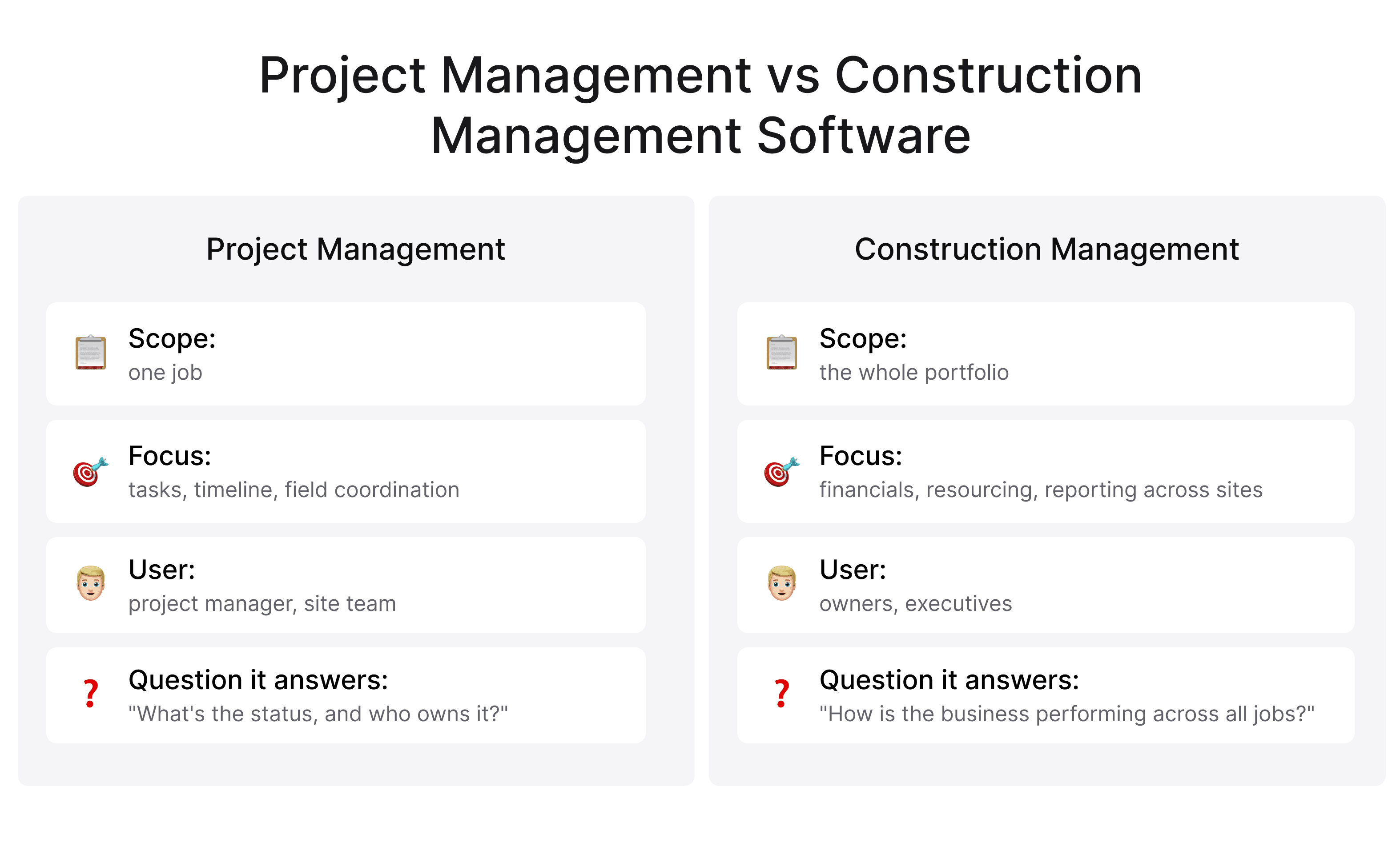
The types of construction management software operate above the single job. While project management focuses on a single project's tasks and timeline, management software oversees the entire portfolio, often integrating financials, resourcing, and reporting across all active sites.
 Click to expand
Vendors blur the labels by calling almost everything management, so judge tools by scope. One product runs the job in front of you. The other runs the company that runs many jobs.
Types of construction management software
At the top end, all-in-one enterprise suites combine scheduling, financials, and field operations under one roof. Modular systems let you switch features on as you grow. Industry-specific options serve general contractors, specialty subs, and owners differently.
Choosing among the types of construction management software comes down to one question: how much you want unified in a single vendor versus assembled from best-in-class specialists. That call shapes your whole technology stack and your switching costs later.
Construction Accounting and Financial Software
What is construction accounting software?
General accounting tools handle invoices and payroll well, but stumble over construction-specific details. Job costing, progress billing, retainage, and AIA-style pay applications follow rules that standard bookkeeping was never designed for.
Construction accounting software handles those natively. It ties every cost to a job and a cost code, so you can see which project earns and which one quietly drains cash long before month-end close.
Key features of construction financial management tools
Look for job costing, progress, and AIA billing, certified payroll, and committed-cost tracking that captures purchase orders before invoices arrive. Reporting should show profit by job, not only the company total, which hides a loss-making project.
Integration is the multiplier. When estimating, project, and accounting tools share one data set, your financial picture updates as work happens rather than weeks later from manual entry.
Not sure where to start with choosing the right construction software??
We can help you figure out what's actually slowing you down and what to build first.
Document Management Software
Why document management is critical in construction
A commercial project generates tens of thousands of files: drawings, specs, submittals, contracts, and change orders. Built from a superseded drawing revision, and the fix can mean demolition. That error is costly and far more common than teams admit.
Document management software maintains one source of truth. Everyone opens the current version, superseded revisions stay archived, and a clear history records who changed what and when.
Key features of construction document management software
Version control is the non-negotiable core. Around it, look for markup tools, role-based access, mobile viewing for the field, and search that surfaces the right file in seconds.
Audit trails carry real legal weight. When a claim arrives on a large job, proving which document was active on a specific date can decide the outcome and save substantial money.
Construction Safety Software
What is construction safety software?
Safety software digitizes the records that keep crews protected and the company defensible: inspections, toolbox talks, incident reports, and certifications. Construction remains one of the most hazardous industries, so these records prioritize people's safety.
They protect the business next. Consistent, documented safety processes lower incident rates, reduce insurance costs, and provide solid evidence when regulators or insurers ask for it.
Key features of construction safety management platforms
Useful features include mobile inspection checklists, photo-based hazard reports, training and certification tracking, and automatic reminders so nothing expires unnoticed. Dashboards let safety managers spot recurring risks across several sites.
Ease of use decides adoption. When logging a hazard takes seconds on a phone, crews actually do it on the spot instead of reconstructing the day from memory later.
Types of construction safety software
Options range from standalone safety apps to modules inside larger management suites, plus specialized systems for high-risk work such as demolition or confined spaces.
Smaller contractors often begin with a single inspection app. Larger firms usually want safety built into the platform they already run, so records stay connected to the rest of the project.
BIM and Design Software for Construction
Building Information Modeling sits at the front of the process. Design and BIM tools produce the 3D models, clash detection, and coordinated drawings that every later stage depends on.
A strong model lets the field build from accurate, conflict-checked information and catch problems on screen rather than in poured concrete. Modern BIM tools integrate directly with project and field platforms, turning the model into a live data source for the whole team.
 Click to expand
Other Construction Software Types Worth Knowing
Several categories play smaller but real roles. Construction CRM manages bids, clients, and the sales pipeline. ERP systems unite finance, HR, and operations into a single backbone for larger firms, and companies that outgrow off-the-shelf options often hire ERP developers to tailor the system to their actual processes.
Equipment and fleet telematics track machine location and usage. Inventory and procurement tools manage materials. Field service apps support repair and maintenance crews. You will not run all of these, though recognizing them helps you spot the gap when a manual process starts eating real hours.
How Modern Construction Platforms Bundle These Tools Together
The market is consolidating. In place of a dozen disconnected apps, unified platforms now combine several types of construction software behind one login and one data set.
The benefits are concrete: no double entry, a single source of truth, and a foreman who opens one app rather than five. Most of these platforms ship as cloud products built on modern SaaS development practices, which is why features are updated continuously, and the whole team works from a browser.
Bundling has limits. A suite that covers everything can handle each part adequately, while a specialist tool excels at one part. The right choice depends on whether your workflows are standard enough to fit a packaged platform or distinctive enough to justify a tailored solution.
When Off-the-Shelf Isn't Enough: Building Custom Tools
Sometimes the catalog has no right answer. A genuinely unusual workflow, a stack of legacy systems that must connect, or licensing for features you will never touch can all push you toward a tailored build.
This is where custom software development pays off. A purpose-built tool matches your process exactly, integrates with what you already run, and charges you only for what you use. Done well, an internal workaround becomes a durable advantage that competitors cannot simply buy.
This is the work Incora takes on. As a team delivering IT solutions for the construction industry, Incora builds platforms around how contractors and developers actually operate, from a single integration to a full ground-up system. The same team can extend or replace pieces of your existing types of construction software without forcing a costly rip-and-replace.
How to Pick the Right Type of Construction Software for Your Project
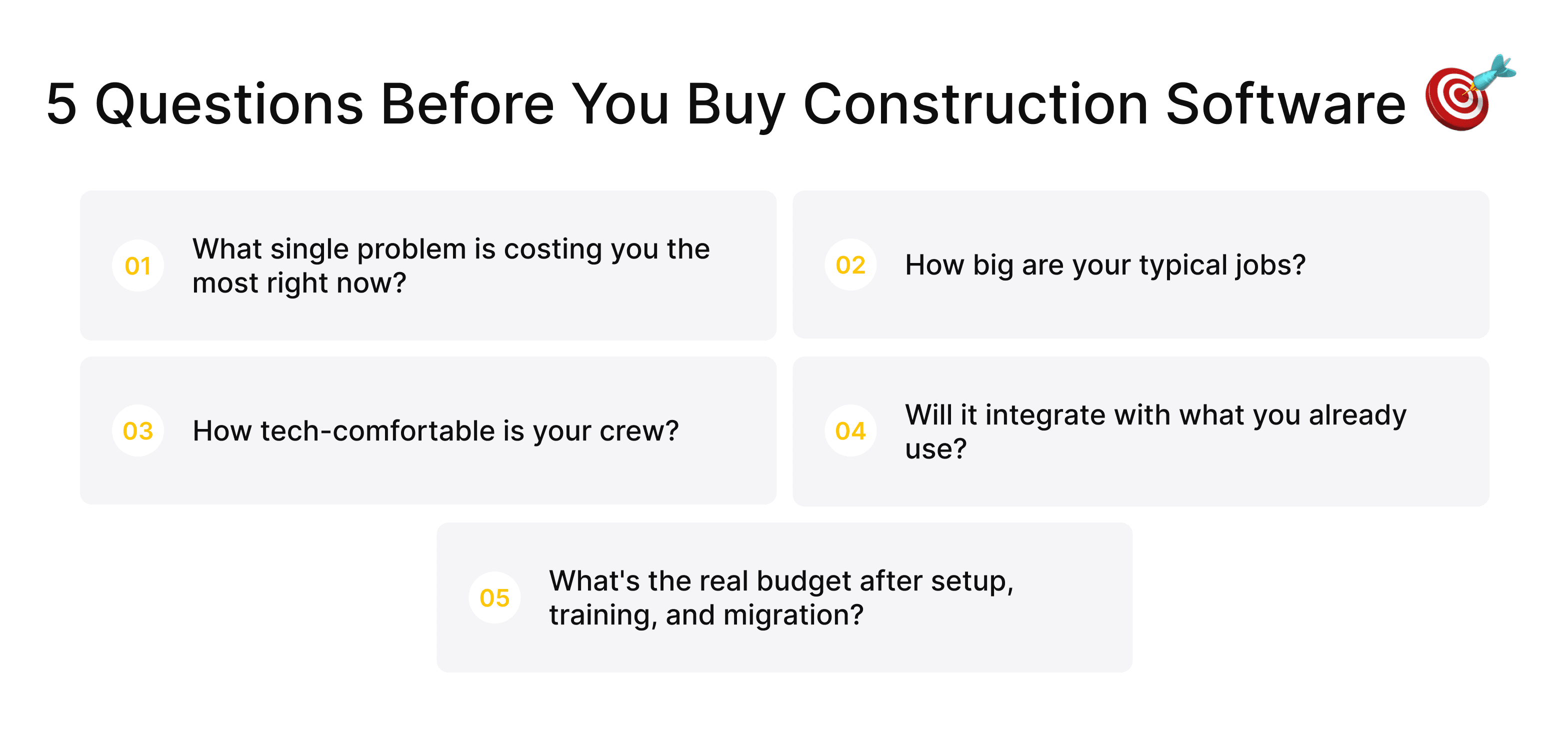
Questions to ask before choosing
Begin from the problem rather than the product. Identify the single thing slowing you down or losing money this quarter, then shortlist tools that fix exactly that. Solving one painful bottleneck well beats buying a broad suite you only half use.
Then weigh practical fit:
 Click to expand
Decide who owns the rollout before you buy. Software succeeds when one person on the team drives adoption. If nothing on the market fits after that review, that is the signal to talk with SaaS developers for construction platforms about a build shaped to your process. Across every option, match the types of construction software to the jobs you do rather than to a feature list.
Final Takeaway
There is no single best tool and no need to buy everything at once. Map the types of construction software to your real problems, pick the one or two that remove the biggest friction, and grow the stack as the wins prove out.
Most teams overbuy early and underuse what they purchased. Get one tool working properly, measure the gain, then expand deliberately. The aim is a project that runs smoother, a budget that holds, and a crew that trusts its tools instead of fighting them.
FAQ
What is the difference between construction management and project management software?
Project management software runs one job: its tasks, timeline, and field coordination. Construction management software runs the entire business across many jobs, typically adding financial and resourcing capabilities. Many platforms do both, so judge by scope rather than the label.
Which type of construction software is best for small contractors?
A lightweight project management tool with built-in scheduling. It replaces scattered texts and spreadsheets with one system. Add estimating and accounting later, once the first tool proves its value.
Do construction companies need all types of software?
Almost none do. The right number of types of construction software depends on your size, trade, and daily problems. Buy for the bottleneck in front of you, not a hypothetical future.
Can one platform replace multiple types of construction software?
Often yes. Unified platforms now combine project management, scheduling, and document control into a single product, and they suit standard workflows. Unusual processes do better with specialist tools or a custom build.


YOU MAY ALSO LIKE



Get in Touch
Got no clue where to start? Why don't we discuss your ideas?

