



By Bohdan Vasylkiv
- CEO & Co-Founder
Best Contractor Estimating Software: 10 Tools Compared for 2026
Compare the top construction estimating software for contractors and home builders: features, pricing, pros and cons, and when a custom tool pays off.
Key Takeaways
- The right tool depends on your trade, project size, and how many bids you send each month.
- Takeoff and estimating are two different jobs, and the strongest tools handle both well.
- Per-seat and flat-fee pricing drift apart fast as you hire, so check the billing unit early.
- Your own historical cost data is worth more than any built-in price book.
It's 9 p.m., the bid is due tomorrow, and you're still cross-checking a spreadsheet three people have edited. One wrong cell, and you either lose the job or win it at a loss.
That's exactly the problem contractor estimating software is meant to fix. Good tools speed up takeoffs, keep pricing consistent, and turn numbers into a proposal your client understands.
The catch? There are dozens of options, and all of them claim to do everything. So we compared ten tools from the top construction estimating software on the market in 2026. You'll see what each does best, what it really costs, and when to build your own.
Quick Comparison: The Best Construction Estimating Software at a Glance
Short on time? This table gives you a fast read on the best construction estimating software for different kinds of contractors, so you can shortlist two or three tools first.
Published prices come from vendors' own pages (October 2026). Where a vendor publishes nothing, "est." marks a third-party estimate.
What Is Contractor Estimating Software?
In plain terms, construction estimating software helps you figure out what a project will cost before you commit to building it. You feed it drawings, quantities, and prices, and it gives you back an estimate you can bid with.
Sounds simple. But a spreadsheet doesn't know that a wall needs studs, drywall, screws, tape, and labor. Good estimating software for contractors does. It bundles items into assemblies, pulls prices from a database, and recalculates everything when one number changes.
Takeoff vs. Estimate: What Is the Difference?
A takeoff is measuring. You go through the plans and count everything: 2,400 square feet of drywall, 38 doors, 650 linear feet of conduit. It answers "how much stuff?"
An estimate is pricing. It takes those quantities and adds materials, labor hours, equipment, sub quotes, overhead, and margin. It answers "how much money?"
Some tools do only one part. Others, like most construction takeoff and estimating software, do both in one place, so quantities flow straight into pricing with no retyping. That handoff is exactly where costly mistakes like to hide.
Where Estimating Fits in Preconstruction: From Plans to Bid to Budget
Estimating isn't a one-off task. It sits in the middle of a chain.
First come the plans and specs. Then the takeoff, which often turns into a bill of quantities that estimators, buyers, and project managers can all work from. Next comes pricing, then the bid. And if you win, that estimate becomes the project budget.
This is why your choice of contractor estimating software matters far beyond the estimating team. If the estimate can't move cleanly into budgeting and job costing, someone ends up rebuilding it by hand. Every rebuild is another chance for numbers to drift.
Key Features to Look For in Estimating Software for Contractors
Every vendor's website looks like a buffet. So let's focus on the features that actually change how fast and accurately you bid.
You won't need all of them, but knowing them helps you judge estimating software for contractors on your real workflow, not on a slick demo.
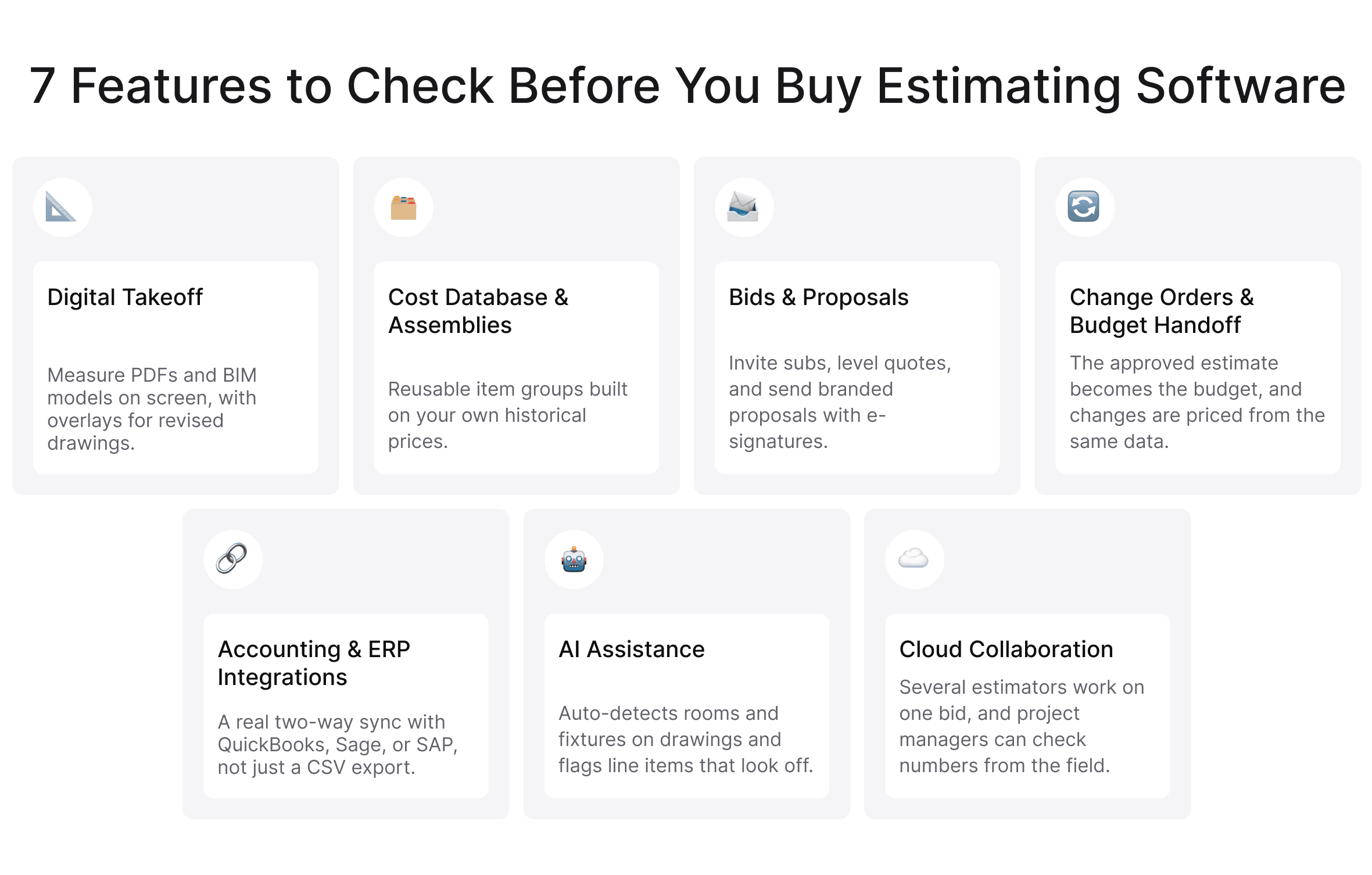
Digital Takeoff From PDFs and BIM Models
Scale rulers are mostly history. Modern tools let you upload PDFs, set the scale, and click or trace to measure areas, lengths, and counts.
The next step up is model-based takeoff. If your architects deliver BIM models, 3D takeoff software can pull quantities straight from the model instead of flat sheets. It's faster and catches details a 2D page hides.
Also, look for construction takeoff and estimating software with overlay tools. When a revised drawing set lands, you want to see what changed, not redo the whole takeoff.
Cost Databases, Assemblies, and Historical Pricing
This is where real speed comes from. A cost database stores materials, labor, and equipment costs, and assemblies group them into reusable blocks, so you add "interior partition wall, 10 ft" instead of twelve separate lines.
Some tools include data like RSMeans, but ask how it's sold. With Sage Estimating, for example, it's a separate subscription.
Over time, your own numbers become far more valuable. If you're comparing construction estimating software for small business, check how easy it is to edit that database. Updating a lumber price should take seconds.
 Click to expand
Bid Management and Proposal Generation
For GCs, bid management means inviting subs, tracking who responded, and leveling quotes side by side. Good construction estimating software for general contractors handles all of this inside the tool, so bid day stops being a scramble through email threads.
For proposals, look for branded templates, allowances, and e-signatures.
Change Orders and Budget Handoff to Project Management
Here's a common pain point. The project starts, the estimate is forgotten, change orders get priced on the fly, and by month three nobody can say how the live budget compares to the bid.
Strong tools push the approved estimate into a budget and price change orders from the same data. Some also connect to construction cost management software, so you can track commitments, actuals, and forecasts against what you first estimated.
That feedback loop is gold. It shows which line items you keep underestimating.
Integrations With Accounting and ERP (QuickBooks, Sage, SAP)
Your estimate shouldn't live on an island. Those numbers need to reach QuickBooks, Sage, SAP, or whatever runs your accounting.
Most construction estimating software offers integrations, and some charge extra (STACK's ERP connectors are a paid Pro add-on). Also, "integrates with QuickBooks" can mean anything from a two-way sync to a CSV export, so ask what data moves and how often.
AI-Assisted Estimating
AI has moved from demo feature to price list. Buildxact sells its Blu AI assistants as $99 to $149 monthly add-ons, and PlanSwift saves AI Auto Takeoff for its higher plan.
So what does AI construction estimating software actually do? It detects rooms, walls, and fixtures on drawings, builds a first-pass takeoff, suggests assemblies from past jobs, and flags line items that look oddly high or low.
What it can't do is replace your judgment about the site or your subs. Think of it as a very fast junior estimator whose work you still review.
Cloud Access and Multi-User Collaboration
With cloud-based contractor estimating software, several estimators can work on one bid at once, project managers can review numbers from the field, and nobody emails "estimate_FINAL_v7.xlsx" around the office.
Top Construction Estimating Software: 10 Tools Compared
Now for the main event. Here's the top construction estimating software for 2026, with current pricing and honest pros and cons.
We've grouped them by who they serve best, because a tool built for heavy civil would be overkill for a kitchen remodeler.
1. Procore Estimating: Best for Mid-Size and Large General Contractors
Procore is best known for project management, and its estimating module plugs straight into that ecosystem. Once you win, the estimate flows into Procore's financial tools.
If you already run projects in Procore, it's one of the most natural choices for construction estimating software for general contractors.
Pricing: custom annual quote based on construction volume, with unlimited users. Independent sources put a bundle with Estimating at $15,000 to $50,000 a year.
Pros: one platform from bid to closeout; hiring never raises the bill.
Cons: steep for small firms; lighter than specialist tools for complex trades.
2. Buildxact: Best Home Building Estimating Software for Residential Builders
Buildxact is made for residential builders who want estimating that doesn't feel like engineering software. It's one of the most popular home building estimating software options among small and mid-size builders.
Pricing: Foundation $199/month, Pro $399, Master $599, or 15% less billed annually. All plans include unlimited users, and there's a 14-day free trial.
Pros: easy to learn; built around residential workflows; four users pay the same as one.
Cons: not built for commercial work; job management starts at Pro; AI add-ons cost extra.
3. STACK: Best Cloud Takeoff and Estimating With a Free Plan
STACK is a cloud-first tool many subcontractors start with, partly thanks to its free plan. You run takeoffs in the browser and build estimates on the same screen.
If you want proper construction takeoff and estimating software without installing anything, it's an easy place to begin.
Pricing: free plan (one active project a month, 50 measurements per project). Premium is $299 and Pro $349 per user/month, billed annually.
Pros: fully browser-based; quick setup; unlimited viewer seats on paid plans.
Cons: per-user pricing adds up fast; the free plan works more like a trial.
4. Autodesk Forma Estimate and ProEst: Best for Commercial Contractors on Autodesk
Autodesk now offers two estimating tools side by side. Forma Estimate is the newer cloud-native option that links 2D and 3D takeoff to estimates, while ProEst offers deeper customization. Both come in the Forma for Preconstruction bundle.
If your team already relies on Autodesk for design and documents, this may be the best estimating software for construction in your stack, because data moves between tools with far less friction.
Pricing: custom quote.
Pros: connected 2D and 3D takeoff; shared cost library; bid management in the same bundle.
Cons: sold as part of a bundle, so you may pay for products you don't use.
 Click to expand
5. Clear Estimates: Best for Remodelers and Small Contractors
Clear Estimates keeps things simple. It's aimed at remodelers who want fast, good-looking estimates without weeks of training.
It ships with a 13,000+ line-item database and 400+ templates, so you can put out a decent estimate on day one. That makes it a solid pick among construction estimating software for small business.
Pricing: Standard $79/month, Pro $119, Franchise from $249 ($59, $99, and $199 billed annually). Extra users cost $9/month; 30-day free trial.
Pros: very easy to use; polished proposals; unlimited AI estimates even on the entry plan.
Cons: lighter takeoff than dedicated tools; better for kitchens and baths than big builds.
6. PlanSwift: Best for Takeoff-Heavy Trade Contractors
PlanSwift is a takeoff specialist. Electrical, plumbing, flooring, and concrete contractors love its point-and-click measuring and drag-and-drop assemblies.
It's a Windows desktop app, which feels old-school to some. But for raw takeoff speed, it's still hard to beat.
Pricing: Essential $2,000/year per seat; Core $3,000/year per seat with AI Auto Takeoff. 14-day free trial.
Pros: fast, accurate takeoff; flexible assemblies; training included.
Cons: Windows only; per-seat cost; limited collaboration.
7. Sage Estimating: Best for Contractors Already Using Sage Accounting
Sage Estimating (once known as Timberline) has been around for decades, with deep cost databases and detailed assemblies.
Its biggest selling point is the link to Sage 100 Contractor and Sage 300 CRE. If your back office already runs on Sage, estimates and job costs line up without anyone retyping numbers.
Pricing: custom quote; third-party estimates start around $300 per user/month. RSMeans data is billed separately.
Pros: very detailed estimating; tight connection to Sage accounting; RSMeans support.
Cons: dated interface; steep learning curve; opaque pricing with add-on costs.
8. HCSS HeavyBid: Best for Heavy Civil and Infrastructure Bids
Heavy civil estimating is its own world, where crews, equipment, and production rates drive the numbers.
HeavyBid is built for exactly that. It uses resource-based estimating, so you price by crew and equipment productivity, then hand off to HCSS field tools once the job starts.
Pricing: custom quote; third-party estimates start near $4,000 a year per seat.
Pros: purpose-built for heavy civil; strong bid-day features; well-regarded support.
Cons: overkill for building contractors; serious setup time.
9. Buildertrend: Best All-in-One Platform for Home Builders
Buildertrend is an all-in-one platform where estimating is one piece of a bigger package: scheduling, client portals, selections, budgets, and change orders.
If you want one system to run the whole residential job, it's a strong pick for home building estimating software that also handles everything after the contract is signed. Just know that estimating lives in the middle tier, so the entry plan will leave you short.
Pricing: custom quote. Independent sources report Essential at about $499/month, Advanced $799, and Complete $1,099, with unlimited users.
Pros: covers the full residential workflow; unlimited users; a genuinely good client portal.
Cons: estimating and change orders start at Advanced; selections only arrive at Complete.
10. Contractor Foreman: Best Budget Option for Small Contractors
Contractor Foreman is the budget-friendly all-rounder, packing estimates, bids, change orders, time cards, and scheduling into one platform.
When you need construction estimating software for small business and every dollar counts, it's hard to argue with the price.
Pricing: billed annually by user count, from Basic at $49/month (one user) to Unlimited at $332. 30-day free trial.
Pros: low price; tons of features; easy onboarding.
Cons: estimating is fairly basic; the interface feels crowded; $49 covers just one user.
Best Home Building Estimating Software: Residential Picks
Residential work has its own rhythm: clients change their minds, selections drive cost, and margins run thin.
Here's how we'd narrow it down:
- Buildxact: the best balance of depth and simplicity, with unlimited users from $199/month.
- Buildertrend: the pick if you want estimating plus full job and client management (budget for Advanced).
- Clear Estimates: fast, simple estimates from $79/month.
- Contractor Foreman: the choice when budget matters most.
When you test residential construction estimating software, pay close attention to allowances and selections. That's where residential estimates usually get messy.
How to Choose the Best Estimating Software for Construction
By now you probably have a shortlist. Here's how to turn it into a decision you won't regret.
The truth is, the best estimating software for construction isn't the one with the longest feature list. It's the one your team actually uses on every bid, including the rushed ones.
Match the Tool to Your Trade, Project Size, and Bid Volume
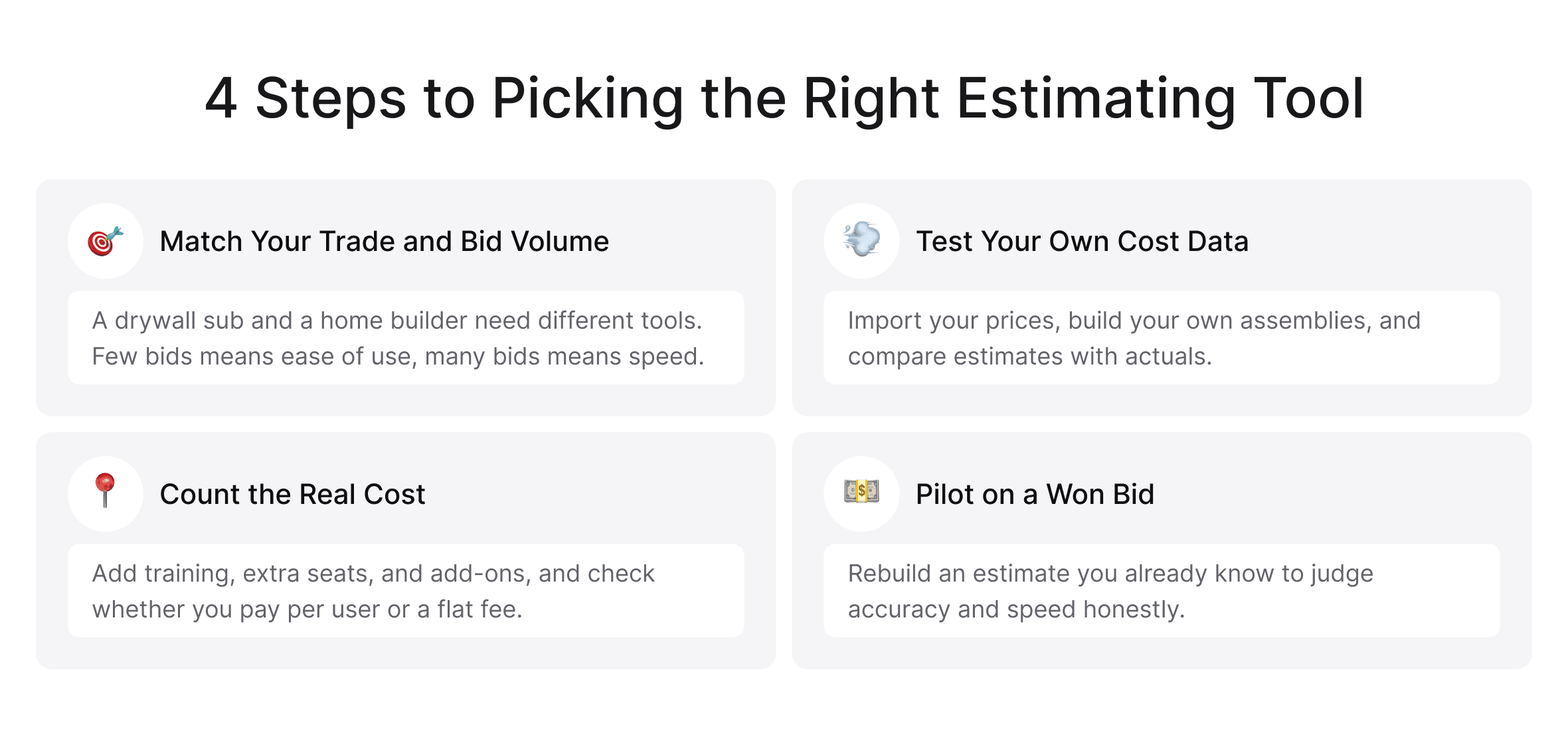
Start with who you are: a drywall sub and a custom home builder need very different things. Then think about volume. Three bids a month? Ease of use wins. Thirty? Speed, templates, and collaboration matter a lot more.
For bigger teams, construction estimating software for general contractors should also handle sub bids and several estimators working at once without friction.
Check How It Handles Your Own Cost Data
Your historical numbers are your competitive edge.
So ask a few direct questions. Can you import your existing cost data? Can you build your own assemblies? Can you compare estimates to actuals after the job wraps up? Even the best construction estimating software is only as good as the data you put into it.
 Click to expand
Calculate Total Cost of Ownership, Not Just the Subscription
The monthly price is just the beginning. Add onboarding, training, extra seats, add-on modules, and learning time.
Then check the billing unit, because this is where comparisons quietly break. Buildxact, Buildertrend, and Procore include unlimited users; STACK, PlanSwift, Sage, and HeavyBid charge per seat. One estimator on STACK Pro costs about $4,200 a year; four cost about $16,800. Buildxact Master stays near $6,100 whether you have one estimator or six.
Finally, if you need construction software integrations with accounting or project management, budget for that work too. Cheap contractor estimating software that forces manual workarounds can easily cost more than a pricier tool that fits.
Run a Pilot on a Bid You Have Already Won
Here's a trick vendors rarely suggest: rebuild the estimate for a project you've already won.
You know the right answer, so you can judge accuracy honestly. And the clicks that annoy you on job one will drive you crazy by job fifty. It's the most reliable way to test estimating software for contractors before you sign a contract.
When Off-the-Shelf Estimating Software Is Not Enough
If your estimating process is what makes your company different (unique pricing logic, complex approvals, and a mix of trades and regions), you may catch yourself bending the process to fit the software. That's usually the moment to look at custom construction software development.
This is where Incora can help. We're a software development and tech integration team that builds custom solutions for construction companies, from estimating platforms to AI assistants and integrations.
Signs You Have Outgrown Packaged Estimating Tools
Watch for these signs:
- Your estimators keep a "shadow" spreadsheet next to the official tool.
- You copy numbers between estimating, accounting, and project management by hand.
- Your pricing rules are too specific for standard assemblies.
- You pay for three tools that don't talk to each other.
- You can't easily compare estimates with actual results.
Case Study: How a Custom AI Estimating Platform Cut Estimation Time by 30%
One of our clients, a UK-based IT services provider for the construction industry, came to us with a familiar problem. Estimates took too long, and cost projections weren't accurate enough to trust.
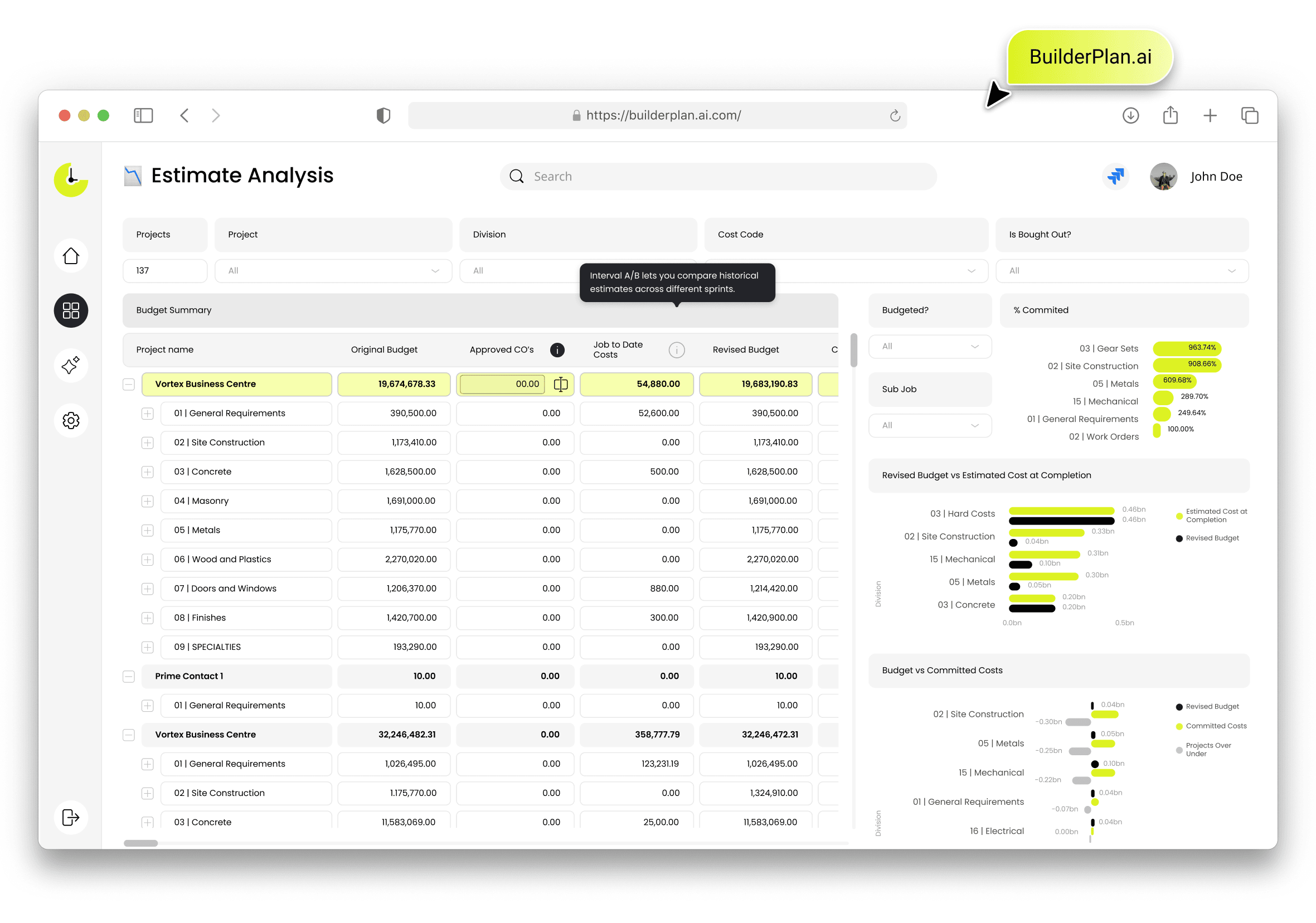
Together, we built BuilderPlan.ai, a custom AI construction estimating software platform. It tracks estimate accuracy for each task, compares estimates against actual time, and highlights recurring mistakes. An LLM-based assistant reviews new estimates against historical data and flags likely errors before the bid goes out.
 Click to expand
The results:
- 30% less time spent on estimations
- 35% fewer project cost overruns
- 15% reduction in compliance risks
Better still, the team can now see why estimates miss and fix those patterns at the source.
Build vs. Buy: How to Decide
Buy when your process is fairly standard and an existing product covers most of what you need.
Build when estimating is a core advantage, you've outgrown several tools, or you spend more on workarounds than a custom platform would cost. And there's a middle path many teams take: keep your existing estimating software for contractors and build custom integrations or AI layers around it.
Not sure where to start with estimating software?
We can help you figure out what's actually slowing you down and what to build first.
Final Thoughts: Choosing Contractor Estimating Software That Grows With You
There's no single perfect tool, only the one that fits how you work today and can grow with you.
Start with your trade and bid volume. Check whether you're buying seats or a flat fee, and test on a job you've already won. The right contractor estimating software will make bid day calmer, your numbers sharper, and your margins easier to protect.
And if no packaged tool fits? That's not a dead end. It may be a sign your estimating process is worth building around.
FAQ
What is the best construction estimating software?
People ask “what is the best construction estimating software?” all the time. Honestly, it depends on your work. Procore and Autodesk Forma Estimate suit larger commercial firms, Buildxact and Buildertrend fit home builders, PlanSwift leads for takeoff-heavy trades, and HeavyBid owns heavy civil.
Which software is most commonly used for estimating?
Excel, still. Among dedicated tools, Procore, Sage Estimating, PlanSwift, STACK, and Buildertrend lead. You’ll find most of them on any list of the top construction estimating software.
Is there free construction estimating software?
Yes, but with real limits. STACK’s free plan caps you at one active project a month and 50 measurements per project, and Buildxact has a free Go plan. They’re great for learning, but the best construction estimating software for regular bidding usually means a paid plan.
Can ChatGPT do construction estimates?
It can help draft scopes or sanity-check assumptions. But it doesn’t know your prices, crews, or drawings, so keep it away from the bid itself. Purpose-built AI construction estimating software connected to your real data is a much safer bet.
What estimating software is best for home builders?
Buildxact is a strong pick for focused estimating, with unlimited users from $199/month. Buildertrend suits builders who want one platform for everything, and remodelers on a budget should look at Clear Estimates.
How much does construction estimating software cost?
Prices vary, and the billing unit matters as much as the number. Entry tools start around $49 to $79 a month, mid-range cloud tools run $199 to $400, and desktop takeoff like PlanSwift costs $2,000 to $3,000 per seat a year. Enterprise construction estimating software is usually quote-only.


YOU MAY ALSO LIKE



Get in Touch
Got no clue where to start? Why don’t we discuss your idea?

