



By Bohdan Vasylkiv
- CEO & Co-Founder
Construction Equipment Tracking: From a GPS Ping to a Job Cost Line
How construction equipment tracking works, what data each asset class produces, and how to turn engine hours into job cost lines inside your ERP.
Key Takeaways
- A GPS ping only becomes valuable once it turns into location, runtime, and utilization data your ERP can bill against.
- Equipment theft is a real cost: industry estimates run into the hundreds of millions of dollars a year, and most stolen machines are never recovered.
- Match the tracking method to the asset. A powered excavator and a towable light tower need very different hardware.
- Off-the-shelf telematics works well until your fleet goes mixed-brand. After that, you need an aggregation layer.
A location on a map tells you where a machine is, and not much else. What actually drives decisions is whether that machine ran today, on which job, for how many hours, and whether those hours will ever appear on an invoice. A GPS ping is only the first step.
Turning that ping into a clean line on a job cost report is what construction equipment tracking is really about. This guide follows the path from machine hardware to job cost: what each asset produces, where money leaks, how data reaches your ERP, and when to build your own layer.
What Construction Equipment Tracking Actually Covers
Good tracking answers 3 questions at once: where an asset is, whether it is working, and who should pay for its time. It has to do that across the whole yard, not only the machines that ship with a factory telematics unit.
The assets that cause the most trouble are usually the ones without an engine. That is why inexpensive construction equipment tracking devices for towables and tools matter as much as the wired units on your heavy iron.
Yellow Iron, Attachments, and the Assets Nobody Logs
Excavators and dozers get the attention, but the assets that quietly distort your numbers are the small ones: plate compactors, generators, breakers, the $8,000 hydraulic hammer that walks off a site. Nobody logs them, so nobody notices until they are gone.
This is where construction tool tracking earns its place. A low-cost tag on a $2,000 attachment tells you which job it is on, instead of which job it disappeared from.
Location, Runtime, Utilization: Three Layers of Data, Three Different Payoffs
Think of the data in 3 layers. Location keeps assets from walking off. Runtime, meaning actual engine hours, gives you a reliable basis for costing, billing, and service scheduling. Utilization shows whether you own too many machines or too few.
Most heavy equipment tracking programs stop at the first layer and leave the rest on the table. Location is the easy part; hours and utilization are where the real return lies.
Where the Money Leaks Without Tracking
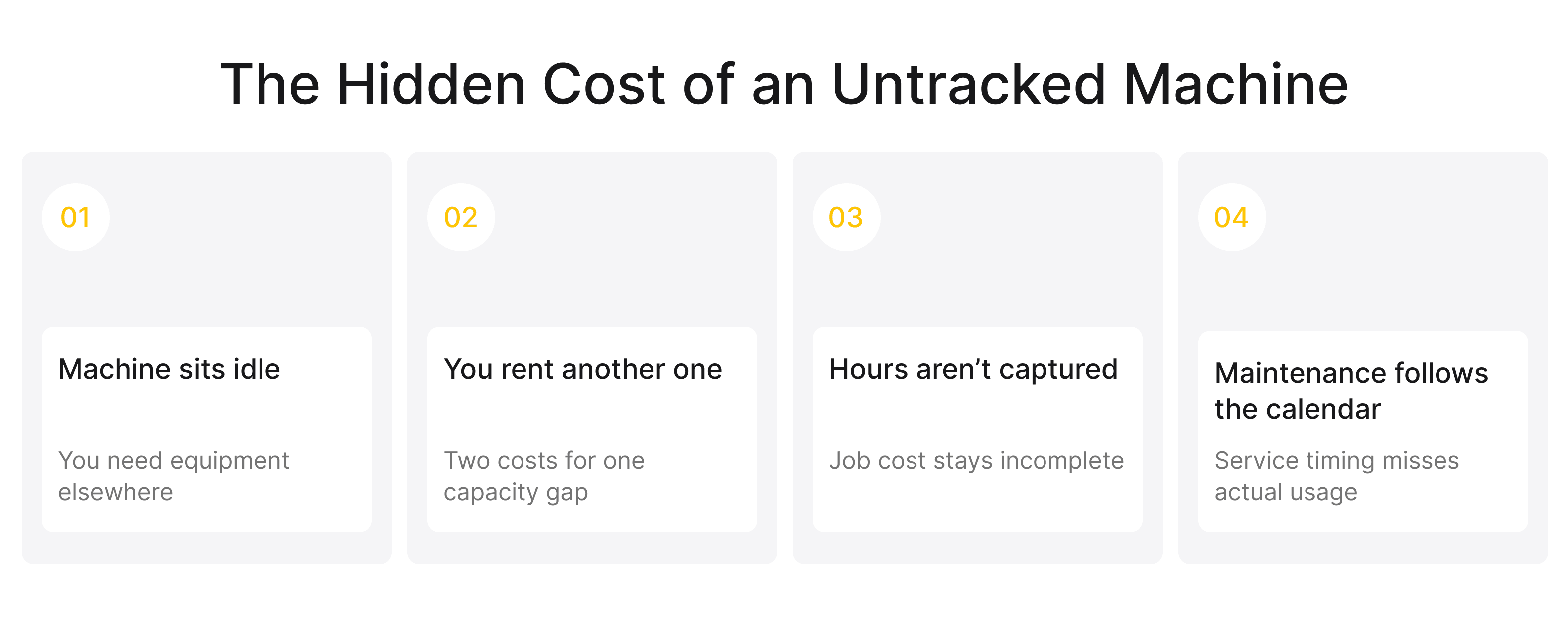
The biggest equipment losses often come from small gaps: stolen machines, idle assets, duplicate rentals, and hours that never make it into job costs. Construction equipment tracking helps make these costs visible and easier to control.
Stolen Iron and a Recovery Rate Under 25%
The National Equipment Register estimates annual U.S. heavy-equipment theft losses at roughly $300 million to $1 billion, with fewer than 25% of stolen machines recovered.
That makes gps tracking for construction equipment useful for more than alerts. If you can locate a stolen machine, you have a better chance of recovering it.
 Click to expand
Idle Machines, Duplicate Rentals and Engine Hours You Never Billed
A quieter loss looks like this. A machine sits idle on one job while a project manager rents an identical unit for another job a few miles away. You pay twice to use one asset at half its capacity.
Once you can see utilization across every yard, that stops. You rent less, move equipment between sites, and stop paying for capacity you already own. It is the same discipline that improves inventory visibility on the materials side, and cutting duplicate rentals alone often covers the cost of the system before a single theft case comes up.
Servicing on the Calendar When the Machine Runs on Hours
Machines wear based on usage, not calendar dates. Servicing too early adds cost; servicing too late can lead to field failures.
Construction equipment telematics provides actual engine hours, so preventive maintenance can be scheduled around how much each machine has really worked.
How a Construction Equipment Tracking System Works End to End
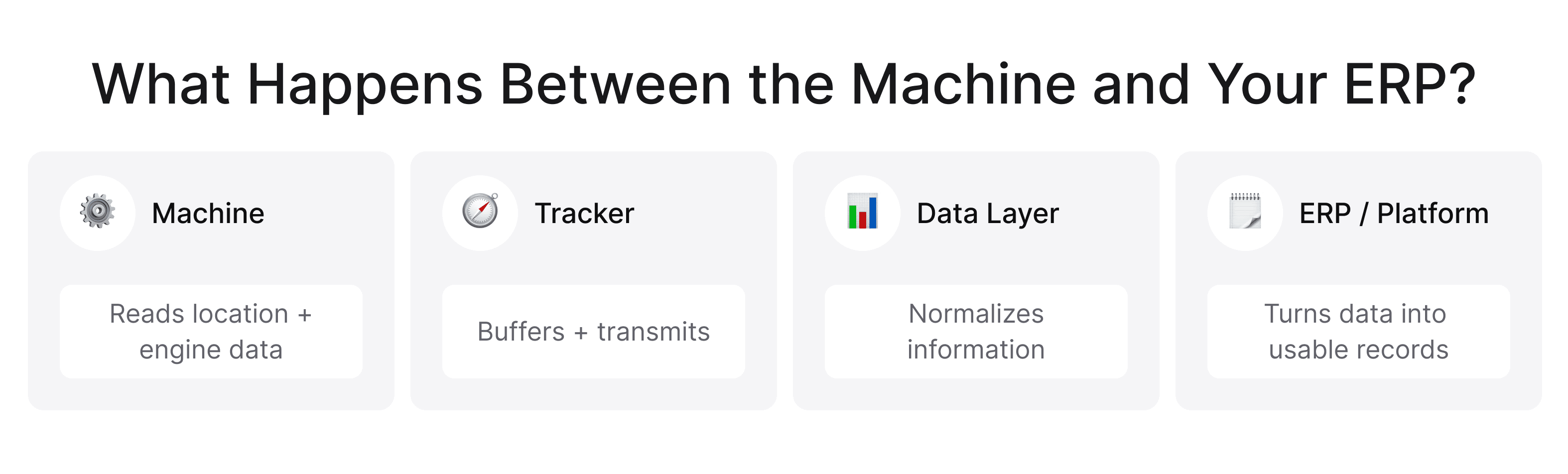
Every system comes down to the same 4 steps: the device reads the machine, buffers data locally, transmits it, and delivers it somewhere you can use it. The hard part is not any single step.
It is keeping the whole chain reliable on a jobsite with poor signal, unclean power, and constant vibration and dust. Solid gps tracking construction equipment succeeds or fails on that last mile, not on the GPS chip.
What the Machine Can Actually Tell You: Ignition Sense vs. CAN Bus (J1939)
Ignition sense shows whether a machine is on and provides GPS location. CAN bus, usually J1939 on heavy diesel, can also provide engine hours, fuel use, DEF levels, and fault codes. Construction equipment gps tracking can therefore range from basic location and status to detailed machine data.
Offline-First by Design: Store-and-Forward, Buffering and Sync Conflicts
Job sites often have poor signal. A heavy equipment gps tracking unit should store readings locally and sync them when the connection returns, preventing missing or duplicated hours.
 Click to expand
Where the Data Lands: Vendor Platform, API, Your ERP
The data eventually has to land somewhere useful. You have three options: the vendor's dashboard, an API you pull from, or a direct feed into your ERP. A dashboard is fine for a single brand and a single team, and most equipment tracking software ships with a competent one.
To drive billing, though, the data has to leave the dashboard. Knowing the different types of construction software in your stack helps you decide what should own the tracking data and what should only read it.
Matching the Tracking Method to the Asset
There is no universal tracker. The goal is not to buy five different systems, but to match the method to each asset while keeping one data model behind all of them.
Miss that, and construction tool tracking turns into five disconnected apps nobody checks. Match it, and every asset class feeds a single, consistent record.
Four Asset Classes, Four Data Signals — and One Data Model That Holds Them
Most fleets fall into four classes. Powered heavy iron (wired, CAN bus, always on). Powered light equipment (wired or plug-in, engine hours). Towables such as generators and light towers (long-life battery units reporting location and movement). And tools (inexpensive BLE tags reporting presence and last-seen).
The right construction equipment tracking devices differ by class, but they should all write into one asset record. That is the real point of heavy equipment tracking: a Cat excavator and a $400 tag appear as rows in the same table.
Writing the Requirements: What Belongs in Scope and What Is Demo Theatre
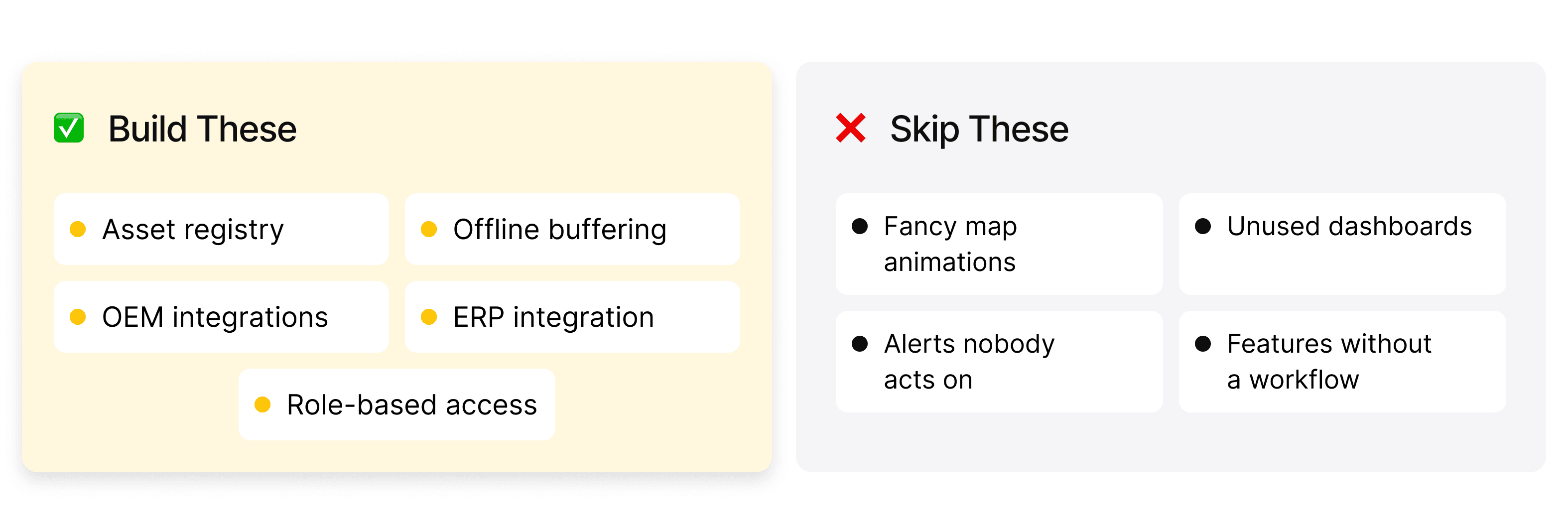
A polished demo is easy to build: a live map, smooth animations, a detailed satellite view. The features that matter are less visual, namely whether the system can export engine hours per asset per day, tag those hours to a job code automatically, and feed your accounting system without anyone retyping numbers.
 Click to expand
Good equipment tracking software is judged on its reports, not its map. Write your requirements around the data you need in your ERP, and evaluate every demo against that list.
Turning Engine Hours Into Job Cost Lines
This is where tracking pays for itself, and where many fleets stop short. A machine logging 6.5 hours in a day only matters when those hours post automatically as a cost line against the right job, at the right internal rate.
Done properly, construction equipment tracking shifts from a security tool to a job-costing engine. The mechanics below show how the hours get there.
Geofence-Driven Cost Allocation per Project Code
Draw a geofence around each site. When a machine runs inside Job 4412's boundary, its runtime can post to 4412 automatically, provided your tracking and ERP are connected. No timesheets, no estimates.
This is where gps tracking for construction equipment delivers real value: cost is allocated by location, at your internal machine rate, with no manual step in between.
Settling Rental Overages and Change Orders With Timestamped Data
Timestamped runtime gives you an objective record to compare against a rental invoice. If the rental house bills 200 hours and your telematics for construction equipment shows 160, you have evidence rather than an argument.
Change orders work the same way. When a general contractor disputes whether extra grading happened, timestamped machine hours inside that area are difficult to dismiss.
Feeding Procore, Sage and Viewpoint Without Double Entry
The main failure point is double entry: hours typed into the tracker, then retyped into Procore, Sage, or Viewpoint. A clean integration removes that step and pushes hours through directly.
Pairing it with proper construction data integration with BI tools turns raw runtime into dashboards your project managers will actually use. Construction equipment tracking software that cannot connect to your ERP is little more than a better whiteboard.
Off-the-Shelf Telematics vs. a Custom Tracking Layer
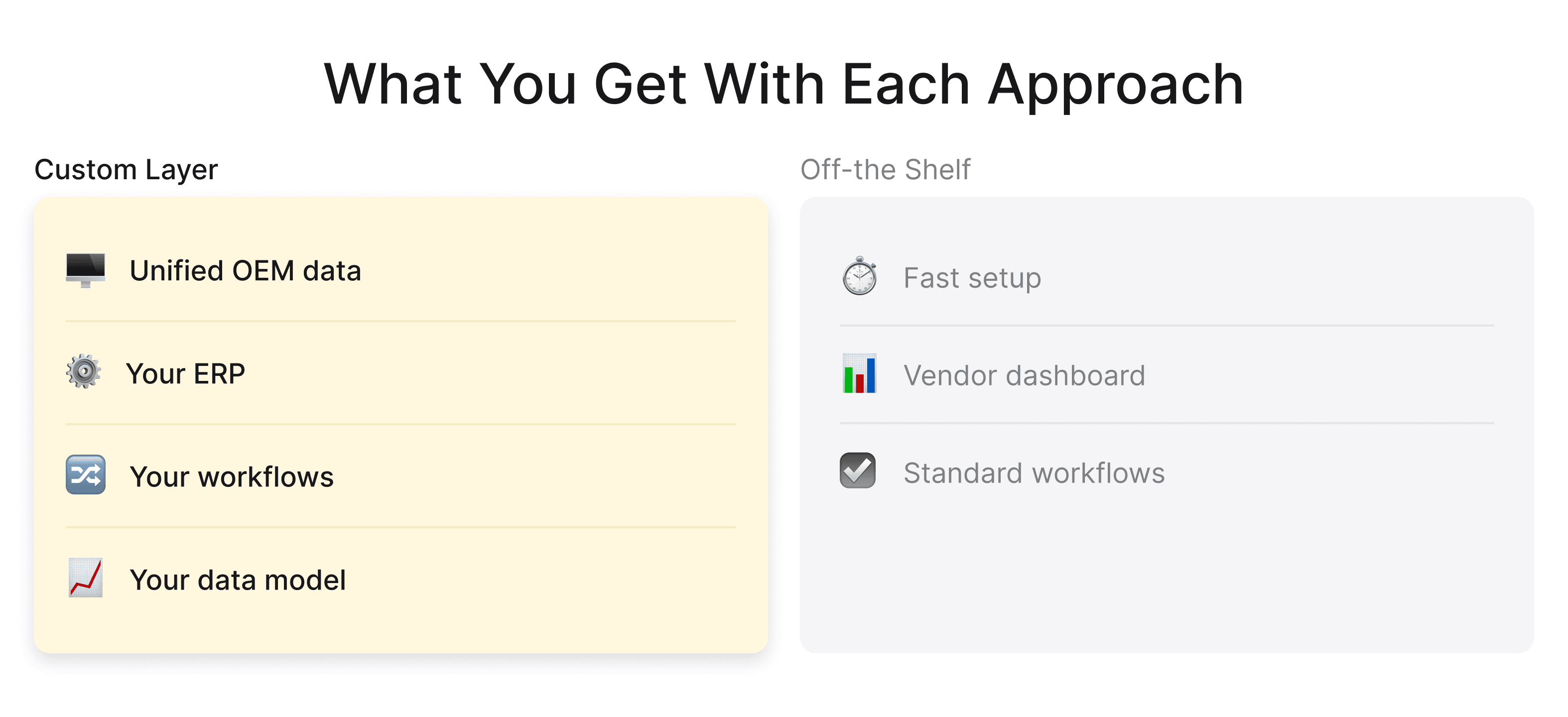
The buy-versus-build question rarely has a single answer, even though "buy" is often presented as the default. For a single-brand fleet, off-the-shelf construction equipment telematics is excellent, and there is no reason to build. The case for building appears only once your fleet stops being simple.
When One Vendor Platform Is Genuinely Enough
If you run mostly one OEM, or a modest mixed fleet you can manage inside a single vendor's dashboard, buying is the right call.
A good off-the-shelf equipment tracking software platform covers theft, hours, and utilization out of the box, with support you do not have to staff. Building your own at this scale rarely pays off.
 Click to expand
When Mixed OEM Telematics Force You to Build an Aggregation Layer
The real constraint is mixed brands. Cat data lives in VisionLink, Deere in JDLink, Komatsu in My Komatsu, and relying on OEM portals alone leaves much of your fleet invisible in any single view.
This is where an aggregation layer earns its cost, and where a construction software development company like Incora fits in, pulling every feed into one normalized model. Unified construction equipment gps tracking across brands is the difference between guessing and knowing.
AEMP / ISO 15143-3: the Standard That Makes Mixed Fleets Possible
AEMP 2.0 (ISO 15143-3) standardizes data such as asset ID, location, engine hours, and fault codes. Construction equipment tracking systems can use these feeds to bring mixed OEM data into one schema. Some feeds update hourly, so integrations need to account for that.
What a Custom Tracking Layer Costs to Build
A custom layer includes data ingestion, normalization, asset records, and ERP integrations, plus ongoing maintenance as OEM APIs change. For large mixed fleets, it can be more practical than paying per asset indefinitely.
Still wondering if equipment tracking is worth it?
Let’s look at where it could actually save you money.
The same approach works for tailored solutions such as an AI construction planning platform. Custom construction equipment tracking connects machine data to the systems your team uses.
Rolling It Out Without Losing the Crew
The technology is the straightforward part; adoption is not. If a rollout feels like surveillance, crews find ways to disable devices. If it clearly saves them time, such as ending disputes over their hours, they support it.
Every successful gps tracking construction equipment rollout earns the field's trust first and worries about dashboards second.
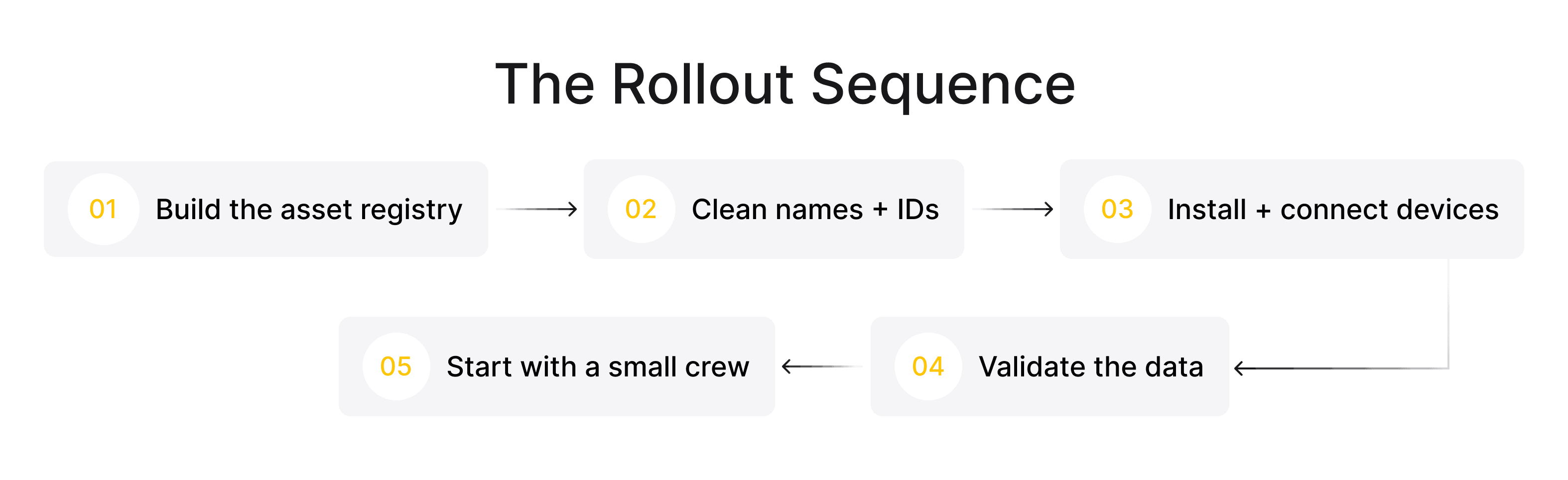
Building the Asset Registry Before You Build Anything Else
Before any device ships, build the registry: one ID and one record for every asset. Without it, tracking produces unlabeled points with no context.
Get this right and heavy equipment gps tracking has a solid foundation, rather than an endless reconciliation problem between "Excavator 3" and "CAT 320."
 Click to expand
The Inventory Audit and Naming Convention Nobody Wants to Do
This step is tedious but decisive. Someone has to walk the yards, photograph serial plates, and agree on naming. That one week of work determines whether your data is trustworthy for the next five years.
A consistent naming convention is what lets telematics for construction equipment roll up cleanly by class, site, and job, instead of fragmenting across spreadsheets.
First 90 Days: The Four Numbers to Watch
Rather than tracking every metric, watch 4: device reporting rate (are the units reporting at all?), hours captured versus expected, utilization per asset, and after-hours movement alerts. If those 4 are healthy at 90 days, the rest tends to follow.
Equipment Tracking Budget in 2026: Per-Asset Subscriptions vs. Building Your Own
On current pricing, tracking hardware typically runs about $50 to $200 per device, with the tracking service adding roughly $10 to $30 per asset per month. Actual costs vary with asset type, tracking method, and vendor.
Per-asset pricing is easy to start and expensive to scale. At 300 assets, a $20 monthly subscription is $6,000 a month, or $72,000 a year, before hardware.
At that point, it is worth weighing the ongoing subscription against the cost of building your own aggregation layer. The honest way to budget gps tracking for construction equipment is total cost over 3 to 5 years, not the price of a single device.
Final Takeaway
Underneath the terminology, the model is simple. A ping tells you where a machine is. Hours tell you what to bill and when to service. Utilization tells you what to own.
The difference between a live-map fleet and a data-driven one is that final step: turning a signal into a cost line. Get the fundamentals right, meaning the registry, naming, and ERP integration, and the system stops being a gadget and starts paying for itself.
FAQ
How does construction equipment tracking work?
A tracker records an asset’s location and, when supported, engine data through ignition sense or the CAN bus. It stores data when offline and syncs it when a connection returns. Construction equipment tracking software can then send runtime and other data to an ERP for job costing, billing, and maintenance.
What are the three types of equipment tracking data?
The three main types are location, runtime, and utilization. Location shows where an asset is, runtime shows how long it operates, and utilization shows how effectively the fleet is being used. Construction equipment tracking systems can combine all three in one asset record.
Can you track construction equipment that has no engine?
Yes. Battery-powered and BLE tracking devices can monitor towables, containers, attachments, and tools without an engine. These devices typically report location and last-seen data, allowing you to manage non-powered assets alongside wired equipment.
How much does construction equipment tracking cost per machine in 2026?
Tracking services typically cost $10–$30 per asset per month, plus $50–$200 for hardware, depending on the device and asset type. OEM data feeds may cost less. For an accurate budget, compare the total cost over three to five years rather than the device price alone.
Can you combine CAT, John Deere, and Komatsu telematics into one dashboard?
Yes. AEMP 2.0 (ISO 15143-3) provides a common data format for compatible OEM telematics feeds. A normalized integration layer can combine data from CAT, John Deere, Komatsu, and other supported brands into one dashboard.


YOU MAY ALSO LIKE


Get in Touch
Got no clue where to start? Why don't we discuss your ideas?

